> ## Documentation Index
> Fetch the complete documentation index at: https://docs.passentry.com/llms.txt
> Use this file to discover all available pages before exploring further.
# Pass Binding
> Restrict digital passes to a specific wallet account, preventing sharing and unauthorized use on both Apple Wallet and Google Wallet.
This feature is in **open beta** and available via custom plan subscription to get access - let us know if you encounter any issues or have feedback.
Pass binding ties a digital pass to a specific wallet account, ensuring that only the intended recipient can use it. This is useful for preventing pass sharing, securing NFC-based access, and ensuring passes are only transactable by the verified holder.
## How it works
Binding works differently on each platform, but the setup is the same - you provide a `binding` object when creating a pass via the API.
Google Wallet uses email-based restrictions. When a pass with binding is downloaded on an Android device, PassEntry generates a SHA-256 hash of the provided email and stores it in the pass. Only the Google account matching that email can save the pass. Any other user who tries to save the pass will see an error message.
 Apple Wallet uses FIDO hardware key binding. When a pass with binding is downloaded on an iOS device, the user is prompted to authenticate using Face ID or Touch ID. This creates a hardware-backed cryptographic key on the device's secure element, which is tied to the user's iCloud account.
Apple binding is particularly beneficial for NFC passes. Once bound, the NFC functionality of the pass is restricted to only work for the authenticated user, preventing anyone else from using the pass at NFC readers.
Supported on iOS 16.4+ and watchOS 9.4+ only.
Apple Wallet uses FIDO hardware key binding. When a pass with binding is downloaded on an iOS device, the user is prompted to authenticate using Face ID or Touch ID. This creates a hardware-backed cryptographic key on the device's secure element, which is tied to the user's iCloud account.
Apple binding is particularly beneficial for NFC passes. Once bound, the NFC functionality of the pass is restricted to only work for the authenticated user, preventing anyone else from using the pass at NFC readers.
Supported on iOS 16.4+ and watchOS 9.4+ only.
 ## Prerequisites
Before using account binding, ensure the following:
* Your organisation has the **pass binding** feature enabled. [Contact PassEntry](mailto:support@passentry.com) if you need access.
* You have a `learnMoreUrl` ready - this is a page on your website where pass holders can get help if their pass enters an invalid state (e.g., a support or FAQ page).
* Your passes **do not rely on barcodes**. Barcodes are prohibited on passes with binding enabled. If your use case requires visual identification, consider using NFC instead.
Barcodes are prohibited on all passes (both Apple and Google) when binding is enabled. This is enforced at pass creation time and also during pass updates - the API will reject requests that include both a barcode and binding.
## Creating a pass with binding
Add the `binding` object to your [pass creation request](/api-reference/v1/passes/create-pass). Binding can only be set at creation time and cannot be added, changed, or removed later.
```json Create pass with binding theme={null}
POST /api/v1/passes?passTemplate=YOUR_TEMPLATE_UUID
{
"pass": {
"fullName": {
"value": "Jane Smith"
},
"nfc": {
"enabled": true
}
},
"binding": {
"email": "user@gmail.com",
"learnMoreUrl": "https://support.example.com/pass-help"
}
}
```
| Parameter | Required | Description |
| ---------------------- | -------- | ------------------------------------------------------------------------------------------------------------------------ |
| `binding.email` | Yes | Email address of the pass holder. For Google Wallet, this must match the user's Google account. |
| `binding.learnMoreUrl` | Yes | HTTPS URL to a page on your website where the pass holder can get help resolving issues. Must be 255 characters or less. |
The response will include the binding status:
```json Response (after creation, before download) theme={null}
{
"data": {
"id": "33b680b7a5460e6cd4646dfd2c1a8c33a6fbfa5c",
"type": "pass",
"attributes": {
"downloadUrl": "https://download.passentry.com?pass=33b680b7...",
"status": "issued",
"binding": {
"platform": null,
"bound": false,
"bindingEmail": "u***@gmail.com",
"learnMoreUrl": "https://support.example.com/pass-help"
}
}
}
}
```
At this stage, the pass has a binding marker but is not yet bound to a platform. The `platform` and `bound` fields are set when the pass is downloaded.
## Binding lifecycle
A pass with binding goes through the following states:
| State | `platform` | `bound` | Description |
| ------------- | ---------- | ------- | ---------------------------------------------------------------------- |
| Created | `null` | `false` | Pass created with binding, not yet downloaded |
| Google bound | `"google"` | `true` | Pass downloaded on Android, restricted to the specified Google account |
| Apple pending | `"apple"` | `false` | Apple binding initiated, waiting for device authentication |
| Apple bound | `"apple"` | `true` | Device authenticated via Face ID/Touch ID, binding complete |
## Platform lock
Once a pass is downloaded and bound to a platform, it cannot be downloaded on the other platform. For example, if a pass is bound to Apple Wallet, attempting to download it on an Android device will return an error.
This also applies to the PassEntry download page - the page will detect the platform mismatch and display an appropriate message to the user.
## What the user sees
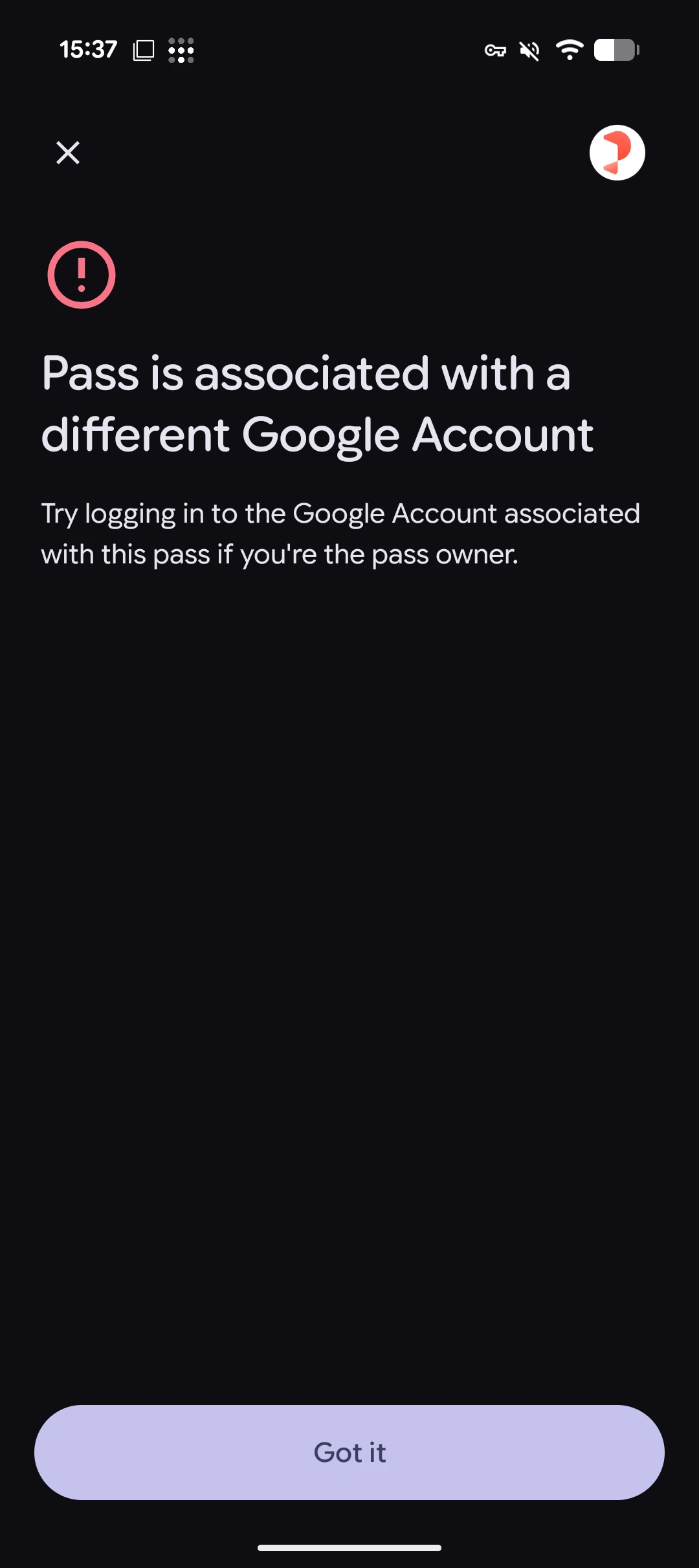
When a user with the correct Google account opens the download link, the pass is saved to their wallet normally. If a different user tries to save the same pass, they will see an error:
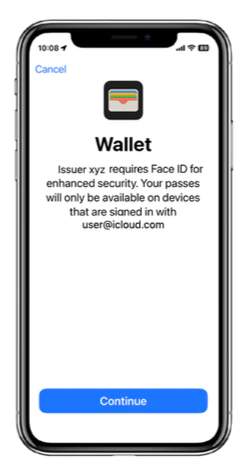
When an iOS user opens the download link for a bound pass, they are guided through the FIDO authentication flow:
1. The user sees a prompt explaining that the issuer requires enhanced security
2. The user authenticates with Face ID or Touch ID
3. The pass is added to their wallet with binding active
If the pass enters an invalid state, users may see one of the following states on their pass:
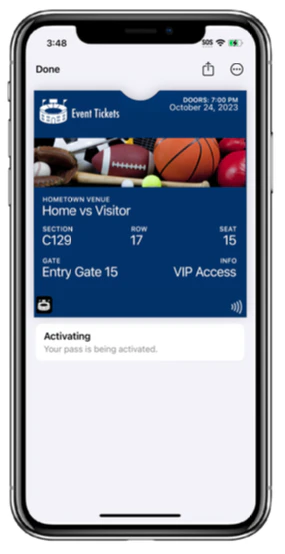
1. **Activating** — The pass is being activated. It will become usable once binding is successful.
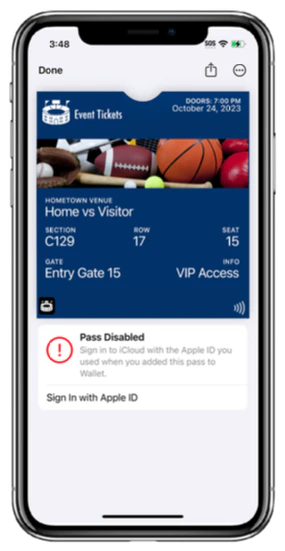
2. **Pass Disabled (Sign in required)** — The user is signed out of iCloud and needs to sign back in with the Apple ID they used when adding the pass.
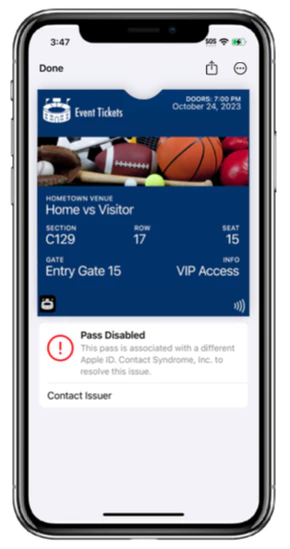
3. **Pass Disabled (Different Apple ID)** — The pass is associated with a different Apple ID. The user is directed to contact the issuer via the `learnMoreUrl`.
## Important limitations
Binding **cannot be updated or removed** after the pass is created. To change binding details, you must create a new pass. Plan your binding configuration carefully before issuing passes.
* **No barcodes**: Barcodes are prohibited on all passes with binding enabled. The API will reject creation requests that include both binding and a barcode.
* **No retroactive binding**: You cannot add binding to an existing pass via the update endpoint. Binding must be set at pass creation time.
* **Platform lock**: Once bound to Apple or Google, the pass cannot be downloaded on the other platform.
* **Apple device requirements**: Apple binding requires iOS 16.4+ or watchOS 9.4+ with Face ID, Touch ID, or a passcode configured.
* **Email handling**: For Google-bound passes, the email is stored encrypted and masked in API responses. For Apple-bound passes, the email is purged after the binding is initiated (it is not needed for FIDO authentication).
## Checking binding status
Binding data is automatically included in single pass responses (create, show, update). For the list endpoint, add `?includeBinding=true` to include binding data.
```bash theme={null}
GET /api/v1/passes/PASS_UUID
```
```json Google-bound pass response theme={null}
{
"binding": {
"platform": "google",
"bound": true,
"bindingEmail": "u***@gmail.com",
"learnMoreUrl": "https://support.example.com/pass-help"
}
}
```
```json Apple-bound pass response theme={null}
{
"binding": {
"platform": "apple",
"bound": true,
"bindingEmail": null,
"learnMoreUrl": "https://support.example.com/pass-help"
}
}
```
Note that `bindingEmail` is `null` for Apple-bound passes because the email is purged after binding initiation.
## Troubleshooting
| Issue | Cause | Solution |
| ------------------------------------------------------- | ----------------------------------------------------------------------------- | -------------------------------------------------------------------------------------------------------- |
| `400` when creating pass with binding and barcode | Barcodes are prohibited with binding | Remove the barcode from the request |
| Google user sees "pass is intended for another account" | Email doesn't match the user's Google account | Ensure the `binding.email` matches the intended recipient's Google account |
| Apple pass shows "Pass Disabled" | User signed out of iCloud or moved pass to a device with a different Apple ID | Direct user to sign back into their iCloud account. The `learnMoreUrl` is shown on the pass for support. |
| Pass cannot be downloaded on the other platform | Platform lock is active | This is expected. Create a new pass if the user needs it on a different platform. |
| `422` when trying to add binding via update | Binding can only be set at creation | Create a new pass with the binding object |
## Related
* [Create Pass API](/api-reference/v1/passes/create-pass)
## Prerequisites
Before using account binding, ensure the following:
* Your organisation has the **pass binding** feature enabled. [Contact PassEntry](mailto:support@passentry.com) if you need access.
* You have a `learnMoreUrl` ready - this is a page on your website where pass holders can get help if their pass enters an invalid state (e.g., a support or FAQ page).
* Your passes **do not rely on barcodes**. Barcodes are prohibited on passes with binding enabled. If your use case requires visual identification, consider using NFC instead.
Barcodes are prohibited on all passes (both Apple and Google) when binding is enabled. This is enforced at pass creation time and also during pass updates - the API will reject requests that include both a barcode and binding.
## Creating a pass with binding
Add the `binding` object to your [pass creation request](/api-reference/v1/passes/create-pass). Binding can only be set at creation time and cannot be added, changed, or removed later.
```json Create pass with binding theme={null}
POST /api/v1/passes?passTemplate=YOUR_TEMPLATE_UUID
{
"pass": {
"fullName": {
"value": "Jane Smith"
},
"nfc": {
"enabled": true
}
},
"binding": {
"email": "user@gmail.com",
"learnMoreUrl": "https://support.example.com/pass-help"
}
}
```
| Parameter | Required | Description |
| ---------------------- | -------- | ------------------------------------------------------------------------------------------------------------------------ |
| `binding.email` | Yes | Email address of the pass holder. For Google Wallet, this must match the user's Google account. |
| `binding.learnMoreUrl` | Yes | HTTPS URL to a page on your website where the pass holder can get help resolving issues. Must be 255 characters or less. |
The response will include the binding status:
```json Response (after creation, before download) theme={null}
{
"data": {
"id": "33b680b7a5460e6cd4646dfd2c1a8c33a6fbfa5c",
"type": "pass",
"attributes": {
"downloadUrl": "https://download.passentry.com?pass=33b680b7...",
"status": "issued",
"binding": {
"platform": null,
"bound": false,
"bindingEmail": "u***@gmail.com",
"learnMoreUrl": "https://support.example.com/pass-help"
}
}
}
}
```
At this stage, the pass has a binding marker but is not yet bound to a platform. The `platform` and `bound` fields are set when the pass is downloaded.
## Binding lifecycle
A pass with binding goes through the following states:
| State | `platform` | `bound` | Description |
| ------------- | ---------- | ------- | ---------------------------------------------------------------------- |
| Created | `null` | `false` | Pass created with binding, not yet downloaded |
| Google bound | `"google"` | `true` | Pass downloaded on Android, restricted to the specified Google account |
| Apple pending | `"apple"` | `false` | Apple binding initiated, waiting for device authentication |
| Apple bound | `"apple"` | `true` | Device authenticated via Face ID/Touch ID, binding complete |
## Platform lock
Once a pass is downloaded and bound to a platform, it cannot be downloaded on the other platform. For example, if a pass is bound to Apple Wallet, attempting to download it on an Android device will return an error.
This also applies to the PassEntry download page - the page will detect the platform mismatch and display an appropriate message to the user.
## What the user sees
When a user with the correct Google account opens the download link, the pass is saved to their wallet normally. If a different user tries to save the same pass, they will see an error:
When an iOS user opens the download link for a bound pass, they are guided through the FIDO authentication flow:
1. The user sees a prompt explaining that the issuer requires enhanced security
2. The user authenticates with Face ID or Touch ID
3. The pass is added to their wallet with binding active
If the pass enters an invalid state, users may see one of the following states on their pass:
1. **Activating** — The pass is being activated. It will become usable once binding is successful.
2. **Pass Disabled (Sign in required)** — The user is signed out of iCloud and needs to sign back in with the Apple ID they used when adding the pass.
3. **Pass Disabled (Different Apple ID)** — The pass is associated with a different Apple ID. The user is directed to contact the issuer via the `learnMoreUrl`.
## Important limitations
Binding **cannot be updated or removed** after the pass is created. To change binding details, you must create a new pass. Plan your binding configuration carefully before issuing passes.
* **No barcodes**: Barcodes are prohibited on all passes with binding enabled. The API will reject creation requests that include both binding and a barcode.
* **No retroactive binding**: You cannot add binding to an existing pass via the update endpoint. Binding must be set at pass creation time.
* **Platform lock**: Once bound to Apple or Google, the pass cannot be downloaded on the other platform.
* **Apple device requirements**: Apple binding requires iOS 16.4+ or watchOS 9.4+ with Face ID, Touch ID, or a passcode configured.
* **Email handling**: For Google-bound passes, the email is stored encrypted and masked in API responses. For Apple-bound passes, the email is purged after the binding is initiated (it is not needed for FIDO authentication).
## Checking binding status
Binding data is automatically included in single pass responses (create, show, update). For the list endpoint, add `?includeBinding=true` to include binding data.
```bash theme={null}
GET /api/v1/passes/PASS_UUID
```
```json Google-bound pass response theme={null}
{
"binding": {
"platform": "google",
"bound": true,
"bindingEmail": "u***@gmail.com",
"learnMoreUrl": "https://support.example.com/pass-help"
}
}
```
```json Apple-bound pass response theme={null}
{
"binding": {
"platform": "apple",
"bound": true,
"bindingEmail": null,
"learnMoreUrl": "https://support.example.com/pass-help"
}
}
```
Note that `bindingEmail` is `null` for Apple-bound passes because the email is purged after binding initiation.
## Troubleshooting
| Issue | Cause | Solution |
| ------------------------------------------------------- | ----------------------------------------------------------------------------- | -------------------------------------------------------------------------------------------------------- |
| `400` when creating pass with binding and barcode | Barcodes are prohibited with binding | Remove the barcode from the request |
| Google user sees "pass is intended for another account" | Email doesn't match the user's Google account | Ensure the `binding.email` matches the intended recipient's Google account |
| Apple pass shows "Pass Disabled" | User signed out of iCloud or moved pass to a device with a different Apple ID | Direct user to sign back into their iCloud account. The `learnMoreUrl` is shown on the pass for support. |
| Pass cannot be downloaded on the other platform | Platform lock is active | This is expected. Create a new pass if the user needs it on a different platform. |
| `422` when trying to add binding via update | Binding can only be set at creation | Create a new pass with the binding object |
## Related
* [Create Pass API](/api-reference/v1/passes/create-pass)